


RainDrop: Virtual Rain Gauge
4.2557.00 Reviews
App Specs
- Version
- 3.1.58
- Updated On
- License
- Free
- Downloads
- 100,000+
- Developer
- RainDropGauge
- Categories
- Weather
- Platform
- Android
Screenshots
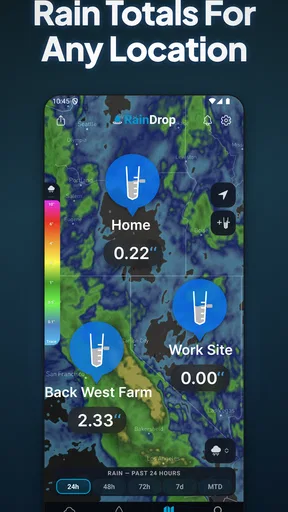
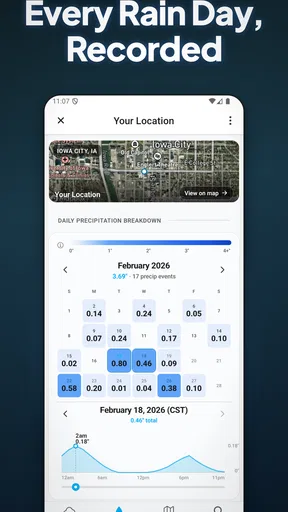
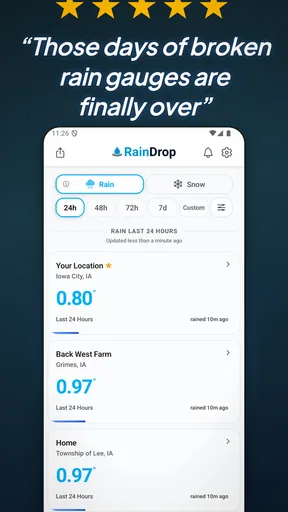
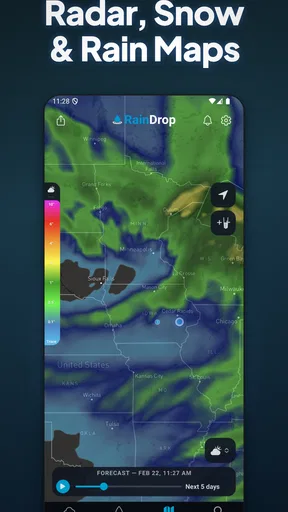
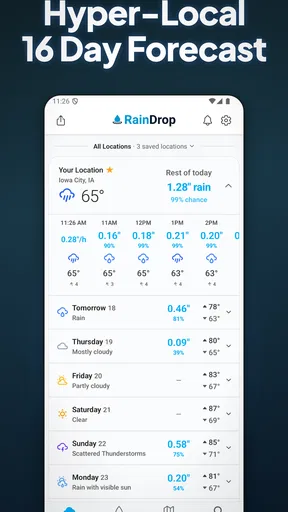
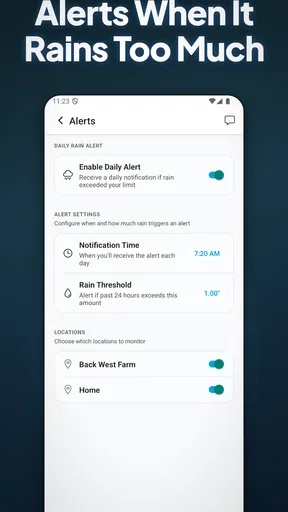
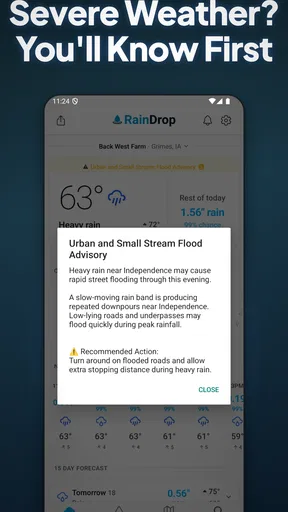
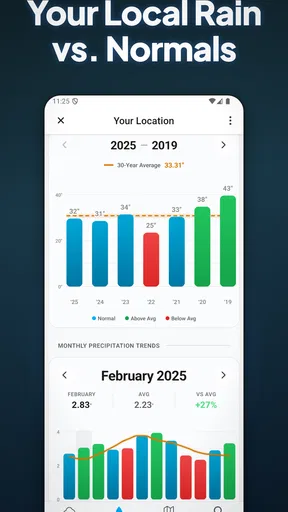
 Analysis by AppCompare
Rain is one of those everyday nuisances that can change a simple plan: a walk becomes a dash, a delivery gets delayed, or a newly watered garden gets drenched again. I like the idea of a weather app focused on rainfall rather than trying to make every forecast detail equally prominent. RainDrop: Virtual Rain Gauge is built around that narrow, practical need. Its appeal is easiest to understand during the first few days, when checking a rain map or rainfall outlook can help answer the immediate question: should I take a jacket, wait before heading out, or move an outdoor task?
Why the first week feels useful
RainDrop is a free weather app from RainDropGauge. It has an average rating of 3.4 from around 1.7 thousand ratings, and more than 100 thousand installs. Those figures suggest a modest, established audience rather than a product everyone already relies on. The app is rated for Everyone, and its current version is 3.0.10. I’d treat it as a focused tool to try alongside whatever forecast app I already use, not as an automatic replacement for every weather check.
The initial appeal is the directness of its rain-focused approach. Instead of opening a general forecast and scanning several panels, I can use a rain map to get a visual sense of where precipitation is falling and how its intensity is represented. That can be more immediately useful than a daily icon when I’m deciding whether to walk to a nearby shop now or wait a little. The key is to use the map as a planning aid, not as a promise that conditions will match perfectly at my exact doorstep.
What changes after the novelty
Rain tools earn their place through repeat decisions, not a satisfying first look at a map. For me, the ongoing value would come from checking it before recurring routines: a commute on foot, a dog walk, or work that depends on keeping equipment outdoors. The seven-day forecast can help with broad planning, such as choosing which day to schedule a picnic, but I would still check again nearer the time. Rain timing is the part of a forecast most likely to matter in the moment, so a week-ahead view is a guide rather than a firm appointment.
Notifications can make the app more useful if I want a nudge instead of remembering to open it. I’d keep alerts limited to situations where rain would actually change my plans; otherwise, even a well-meant warning becomes background noise. If I’m leaving home for a short errand, a quick look before I go may be enough. If I’m planning a longer outing, I’d combine the rain view with a broader forecast and keep a flexible backup plan.
A realistic routine, not another screen habit
Picture a weekday morning with laundry outside and a walk to the bus stop ahead. I’d check RainDrop before hanging the clothes, then take another look before leaving if the sky seems uncertain. That two-step habit is more useful than repeatedly refreshing an app all day: the first check informs a decision, and the second helps catch a change that could affect the commute. For gardening, the same logic helps avoid watering automatically just before expected rain, though I’d use local conditions and the plants’ needs rather than treating a forecast as a measurement of the soil.
There is a trade-off in relying on location-based weather. A forecast tied to where I am is convenient for local decisions, but it is less useful for planning a trip somewhere else unless I can set or search another place. I would check that the displayed location is the one I mean before making a plan, particularly when travelling or comparing home with a destination. That small verification step prevents a familiar problem: confidently reading the right forecast for the wrong place.
Worth Reading Before You Choose

EA SPORTS FC Mobile 26 Is a Bigger Football Game, but It Takes Time

Flipboard Shows What News Apps Must Do Beyond the Feed

Switching to Android Auto Means Rethinking Your Driving Routine

Google Calendar Makes a Crowded Week Easier to Manage

Ludo King Makes the Most of the Minutes Between Plans

Baby Panda World Brings Quick Play to Modern Phones, but Its Game Library Feels Busy
Where it sits beside other weather apps
Compared with a typical all-purpose weather app, RainDrop’s strongest case is its emphasis on rain, especially when a map is easier to interpret than a row of hourly symbols. A general forecast remains the better everyday home base if I need a wide range of conditions in one place, or if I want to compare several kinds of weather before making a decision. I’d keep RainDrop as a companion when rainfall is the deciding factor rather than expecting one focused app to cover every weather question.
It also isn’t a substitute for an official warning source when safety is involved. For an ordinary shower, deciding whether to carry an umbrella is a low-stakes use; for severe weather, I’d check relevant local alerts and follow official advice. No rain map can remove uncertainty from fast-changing conditions. That distinction matters because a clear visual display can feel more exact than a forecast really is.
The effort of keeping it useful
RainDrop’s simple premise should make it easy to revisit, but any weather app can become clutter if alerts interrupt too often or if I check it without a decision in mind. I’d start with location access needed for local forecasts, then review notification preferences and keep only the prompts that support a real routine. If the app asks for settings I don’t need, I would avoid enabling them by habit. A useful rain checker should save attention, not demand it.
The app is free to download, with in-app purchases ranging from $2.99 to $149.99 per item. That wide span is a reason to read each purchase screen carefully rather than assume every paid option is a small upgrade. I’d begin with the free experience and only consider spending if a specific paid feature solves a recurring problem for me. Since rain checks are often brief, paying makes sense only when the extra detail changes what I can do, not simply because an upgrade is presented.
Who will get the most from it
I can see RainDrop fitting people whose plans are regularly affected by rain: walkers, cyclists, gardeners, parents organizing outdoor time, and anyone who needs to protect items left outside. It is especially sensible as a second opinion for a person who already has a general forecast app but wants a rain-centred view. The app is also approachable for someone who does not want to learn a complicated weather dashboard, provided the focused information matches what they actually need.
I’d skip it if I rarely make decisions based on rainfall, if I need a complete weather service in one place, or if notifications and frequent checks tend to make me more anxious than prepared. It may also be the wrong choice for someone expecting a rain gauge to provide a physical measurement at their home: a virtual rain tool is useful for forecast-led planning, but it should not be confused with a personal instrument collecting rain on site. If exact rainfall at a property is essential, a dedicated physical gauge is a more direct option.
What Is RainDrop All About?
At its core, RainDrop: Virtual Rain Gauge is designed to give you hyper-local rain forecasts. But it doesn’t stop there. This app goes beyond just telling you if it’ll be a wet or dry day. It offers precise information on rainfall intensity and duration, directly on your smartphone. Think of it as having a little meteorologist in your pocket.
Setting Up: Easy Peasy
Getting started with RainDrop is a breeze. After downloading it from the app store, you’ll be greeted with a sleek interface that’s both intuitive and user-friendly. No need to wade through endless settings or tutorials. Just allow it access to your location, and you’re good to go. It’s perfect for those who aren’t exactly tech-savvy.
Features That Stand Out
So, what makes RainDrop shine? For starters, it offers real-time rain alerts, so you’ll always know when to expect a drizzle or a deluge. The app uses advanced radar technology to give you the most accurate forecasts possible. And trust me, it’s pretty spot-on.
One of my favorite features is the rain map. It visually shows you where rain is currently falling, using color-coded indicators for intensity. It’s like watching a weather report unfold in the palm of your hand. Plus, you can check the forecast up to seven days in advance, which is handy for planning outdoor activities.
RainDrop in Daily Life
Let’s talk practicality. Imagine you’re planning a weekend hike. A quick glance at RainDrop lets you know whether to pack that raincoat or leave it behind. Or maybe you’re organizing a picnic and want to avoid any soggy sandwiches. With RainDrop, you’ll be the go-to person for weather updates among your friends.
And it’s not just for the outdoorsy types. Urban dwellers will appreciate knowing exactly when to dash out for errands or when to simply stay cozy indoors with a book. The app’s notifications are timely and unobtrusive, ensuring you’re always one step ahead of Mother Nature.
Is It Worth It?
Now, you might be wondering, is RainDrop worth the space on my phone? In one word: absolutely. It’s free to download, with an option for premium upgrades if you want even more detailed forecasts. But even the basic version packs a punch with its accuracy and ease of use.
What I really appreciate is the app’s commitment to user feedback. The developers seem genuinely invested in making continuous improvements based on what users need and want. It’s refreshing to see an app that’s not only functional but also evolving.
The Final Drip
In a world where weather can be as unpredictable as a cat, RainDrop: Virtual Rain Gauge offers a reliable way to plan your day without any surprises. Whether you're a weather enthusiast or just someone looking to dodge the next cloudburst, this app is a must-have. So, why not give it a whirl? You might just find yourself checking the forecast a little more often.
That last habit is the real test. If checking the rain view quickly prevents a wet commute or helps me choose a better time for an outdoor task, it has earned a small place in my routine. If I find myself opening it without changing a decision, or ignoring alerts because they arrive too often, the novelty has worn off and there is little reason to keep it active. I’d give it a short trial through the kinds of days when rain affects my plans, then judge it by whether it reduces guesswork rather than by how often I look at it.
RainDrop is therefore best approached as a practical specialist, not a complete answer to the weather. I’d keep it if rainfall is a recurring problem and its map or alerts make everyday choices easier; I’d pair it with a general forecast for wider planning and official sources for safety. Its focused purpose is also its limit, but for people who regularly need to decide what to do about rain, that focus can be enough to make the app worth keeping.
Pros
- Accurate real-time rainfall data.
- User-friendly interface design.
- Customizable alerts for rain events.
- Integrates with smart home devices.
- Offline access to historical data.
Cons
- Limited free version features.
- Requires constant internet connection.
- Occasional data sync issues.
- Ads present in the free version.
- High battery consumption on GPS use.
FAQs for RainDrop: Virtual Rain Gauge
What is RainDrop: Virtual Rain Gauge and how does it work?
RainDrop: Virtual Rain Gauge is an app designed to help users track rainfall in their area. It uses data from local weather stations and satellites to provide accurate and up-to-date rainfall measurements. The app allows users to view historical data, set alerts for specific rainfall thresholds, and even track rainfall trends over time.
Is RainDrop: Virtual Rain Gauge available for both Android and iOS?
Yes, RainDrop: Virtual Rain Gauge is available for both Android and iOS devices. You can download it from the Google Play Store for Android or the Apple App Store for iOS. The app is regularly updated to ensure compatibility with the latest operating systems on both platforms.
Does RainDrop: Virtual Rain Gauge require an internet connection to function?
Yes, RainDrop: Virtual Rain Gauge requires an internet connection to access real-time weather data. The app downloads rainfall information from various weather stations and satellites, which necessitates a stable internet connection. However, users can access previously downloaded data offline and view historical trends.
Are there any subscription fees or in-app purchases in RainDrop: Virtual Rain Gauge?
RainDrop: Virtual Rain Gauge offers a free version with basic features. However, there is also a premium subscription available, which provides additional features such as advanced analytics, personalized alerts, and ad-free usage. Users can choose to upgrade within the app to access these enhanced functionalities.
How accurate is the rainfall data provided by RainDrop: Virtual Rain Gauge?
The accuracy of RainDrop: Virtual Rain Gauge depends on the quality and coverage of local weather stations and satellite data. Generally, the app provides highly accurate and reliable measurements, but users should be aware that extreme weather conditions might affect data accuracy. Regular updates improve precision and address any discrepancies.


